
- After following Figure 1(a), (b) diagram instructions in Wiring Diagram section . Connect a Thermocouple Input Expansion module in to the 40
pin board to board connector in CPU Module (Explained in MC-CPU-CM4-Gx datasheet). - Now open Terminal Window after turn on the CPU Module.
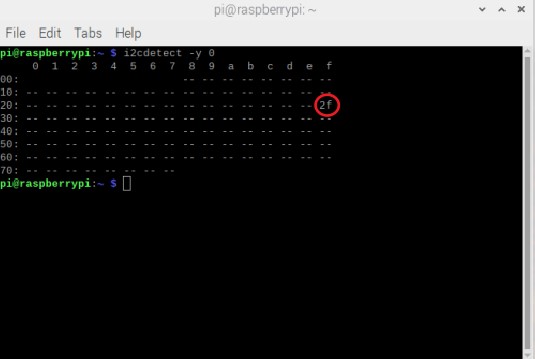
- Type ‘i2cdetect -y 0’ command and run the command.
- The result will be similar to the Figure 1 shown below.
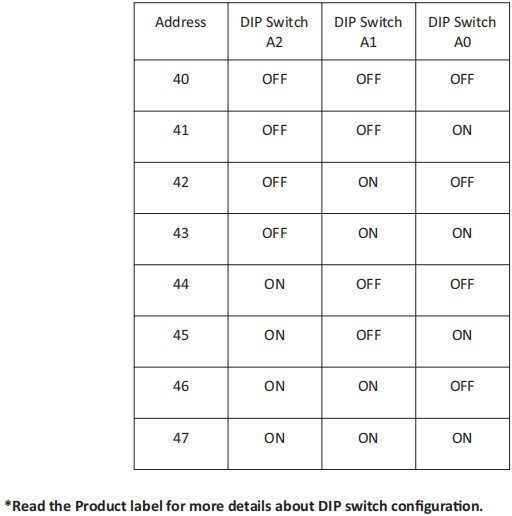
- Here the ‘0x2F’ is the Thermocouple Input expansion module I2C address, This I2C address can be changed according to user requirement
by changing the DIP switches configuration (Check Figure 1(a)) on expansion module.
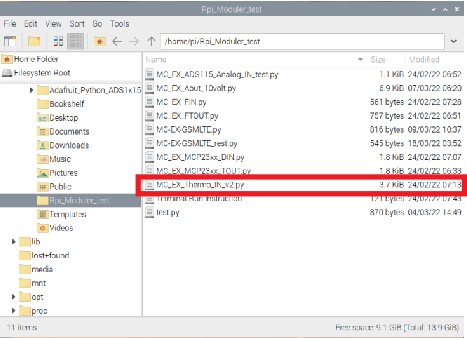
- Follow the File Manager > Pi > Rpi_Moduler_test path, then open Rpi_Moduler_test folder.
- In Rpi_Moduler_test folder include example program for every expansion module.
- Select the MC_EX_Thermo_IN_v2.py example program that matches with the Thermocouple Input expansion module shown in Figure 2.
9. The python program will open on default Thonny Python IDE. Click RUN for start the program shown in Figure 3.
