- Follow Wiring Diagram, complete wiring diagram. (Follow Node-RED Startup Guide if you are beginner to run node red on these products.)
- Go to left “Toggle palette” & scroll down to “MC EX” category, drag and drop “FD4” node.
*Nodes in “MC EX” category can use to program Modular industrial controller expansion modules (Check Figure 1).

- Scroll up to “common” category drag and drop two “inject” nodes & “debug” node (Check Figure 2).

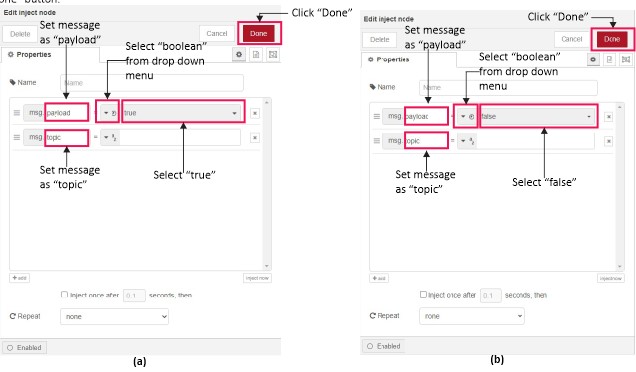
- Double click on one “inject” node, Select “true” from the drop down menu (Refer Figure 3(a) node settings), Finally click “Done” button.
- Now double click on second “inject” node, Select “false” from the drop down menu (Refer Figure 3(b) node settings),Finally click “Done” button.
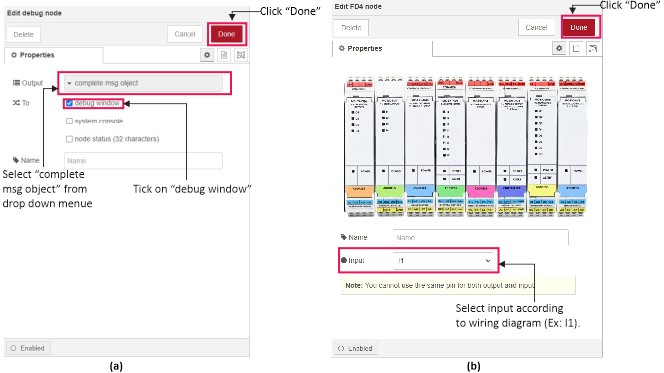
- Next double click on “debug” node then select “complete msg object” (Refer Figure 4(a) for node settings), Finally click “Done” button.
- Then double click on “FD4” node select “I1” from the “Input” drop down menu (Refer Figure 4(b) for node settings), Finally click “Done” button.
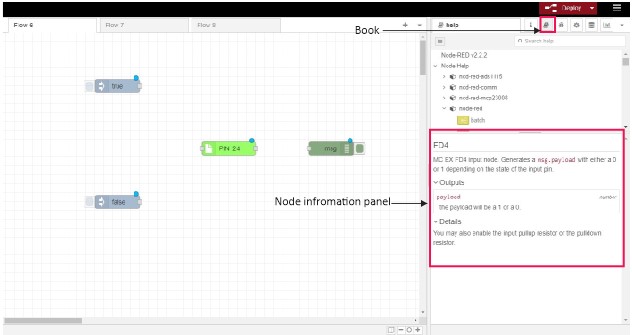
- For get information regarding “FD4” node click symbol then click on node selected (Check Figure 5).
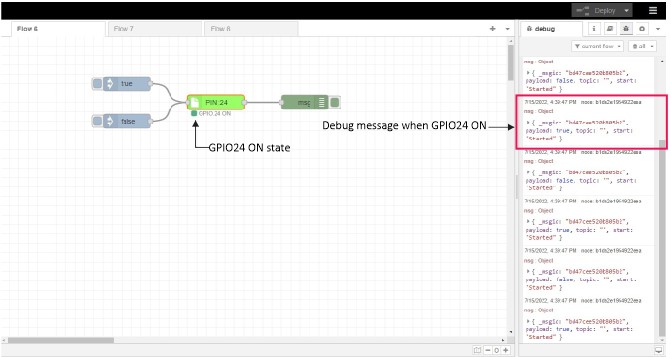
- Link The nodes according to Figure 6, Click “deploy” button for run Node-Red program (Click on “true ” state before feed input signal).

- For monitor Debug message click “Debug” symbol Figure 7(a) & (b) show the result when input signal feed on expansion module.